


Bill Payment Reminder, Budgets
4.57.71K Reviews
App Specs
- Version
- 1.26.027
- Updated On
- License
- Free
- Downloads
- 1,000,000+
- Developer
- TimelyBills
- Categories
- Finance
- Platform
- Android
Screenshots

 Analysis by AppCompare
I tend to notice the value of a bill tracker most on an ordinary, busy week—not when I am making a grand financial plan, but when several small payments are due and I would rather not keep them all in my head. Bill Payment Reminder, Budgets is built for that kind of routine: it brings recurring bills and everyday spending into one place, so I can check what is coming up and decide what needs attention.
Who benefits most from this approach
I’d recommend it to someone whose finances are manageable but scattered: a rent reminder in one calendar, a utility bill in an email, and a rough grocery limit in their head. The app is a finance tool from TimelyBills, and its focus on reminders alongside budgets makes it more useful for day-to-day organization than a simple list of payment dates. It is free to install, though optional in-app purchases range from $0.99 to $64.99 per item. That makes it sensible to begin with the free experience and decide whether any paid option is worth considering only after you know how often you use it.
It is also a reasonable fit for households where more than one person needs a shared view of upcoming expenses. A family can use a bill-and-budget routine to discuss what is due before a payment becomes urgent, rather than relying on one person to remember everything. I would still treat the app as an organizer, not as a replacement for checking the actual bill or confirming that a payment went through. A reminder helps me act on time; it does not itself settle a bill.
A practical routine for bills and spending
Imagine payday arrives and I have rent, a phone bill, and a couple of smaller subscriptions due later in the month. I can record the bills and their due dates, then choose reminders early enough to leave room for a transfer or a question about an unexpected charge. At the same time, I can set a grocery budget for the month. When I make a purchase, logging it against that category gives me a more useful picture than simply checking the account balance: I can see whether the grocery allowance is being used faster than expected while the next bills are still ahead.
A helpful habit is to schedule a short weekly check-in rather than opening the app only when a notification appears. I would review upcoming due dates, enter recent spending, and adjust a category only when there is a real reason—for example, a planned family meal or a one-off household purchase. This separates a changed plan from an accidental overspend. It also avoids the common trap of setting a budget once and then treating it as accurate even when the month has changed.
Receipt photos and notes can make that routine more practical. If I buy something that could belong to either household supplies or groceries, a quick note gives future me context for the entry. A receipt image may also help when I want to check an amount later without searching through a paper pile. The trade-off is that detailed record-keeping takes effort: someone who rarely enters purchases may get less value from category tracking than from the simpler bill reminders.
How the app fits into a changing finance routine
I see this section as a useful way to judge whether the app can keep pace with changing habits, rather than treating a familiar setup as something that should never be revisited. When income timing, household responsibilities, or regular expenses shift, I would first adjust the reminders and categories I actually rely on, then give the routine time to settle. That makes it easier to tell whether the current version supports my needs and what I would want to see improve next.
Worth Reading Before You Choose

EA SPORTS FC Mobile 26 Is a Bigger Football Game, but It Takes Time

Flipboard Shows What News Apps Must Do Beyond the Feed

Switching to Android Auto Means Rethinking Your Driving Routine

Google Calendar Makes a Crowded Week Easier to Manage

Ludo King Makes the Most of the Minutes Between Plans

Baby Panda World Brings Quick Play to Modern Phones, but Its Game Library Feels Busy
First Impressions
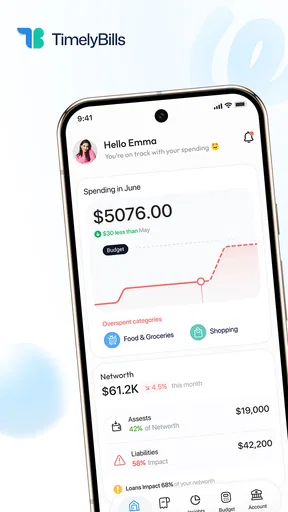
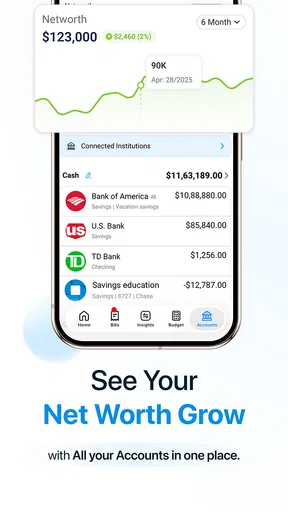
When I first downloaded Bill Payment Reminder, Budgets, I was impressed by its clean and intuitive interface. The app opens up with a dashboard that gives you a quick overview of your financial health. It's like having a personal finance assistant right in your pocket. The design is user-friendly, making it easy for anyone to navigate, whether you’re a seasoned budgeter or new to managing your finances.
That overview is most valuable when I keep the underlying entries current. A dashboard can only reflect the bills and spending I have actually recorded, so I would not use a glance at it as proof that every account is up to date. For a new user, a manageable start is to enter the recurring bills first, then add only the budget categories that matter most. A small, maintained setup is more useful than a long list of categories that gets abandoned.
Key Features
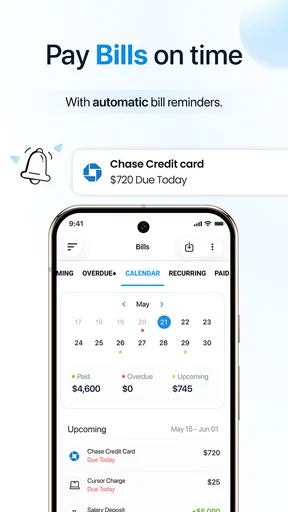
The app is packed with features that make budgeting and bill management a breeze. It allows you to set up reminders for upcoming bills, helping you avoid those dreaded late fees. You can customize these reminders to alert you a few days before a bill is due, ensuring you have ample time to make the necessary payments.
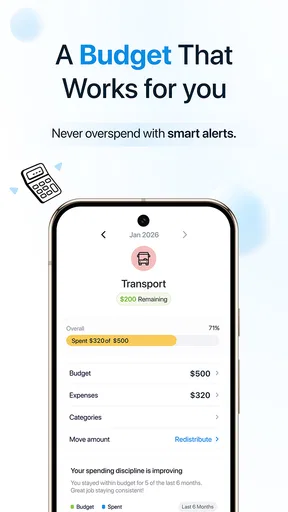
Another handy feature is the budget tracker. You can set up multiple budgets for different categories, like groceries, entertainment, and utilities. The app then tracks your spending and alerts you when you’re nearing your budget limit. It’s like having a financial watchdog keeping an eye on your spending habits.
The useful judgment call is how much warning to give each bill. A payment that needs a bank transfer may deserve more lead time than a bill I can pay quickly, while a reminder set too far ahead may be easy to dismiss and forget. I would tune the timing to the payment method and my own payday rhythm, then review the schedule after the first month. That small adjustment can make reminders feel like prompts to act rather than background noise.
User Experience
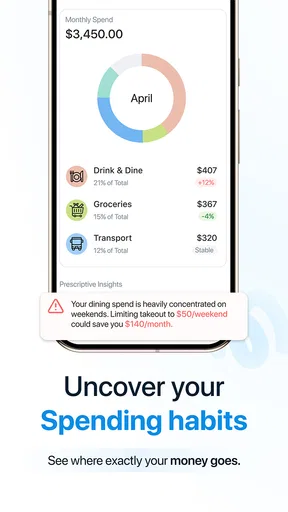
Using the app is straightforward. Adding new bills or adjusting your budget categories is as simple as a few taps. I found the process of setting up my monthly expenses to be seamless, with each step clearly outlined. The app also provides a detailed breakdown of your expenses, allowing you to see where your money goes each month.
Personalization is another strong suit of this app. You can categorize your payments, attach notes, and even upload photos of receipts. This level of detail is perfect for those who love to keep their finances organized down to the last penny.
For a shared household, consistent naming and categories matter more than they might at first seem. If one person records a purchase as “food” and another uses “groceries,” the record becomes harder to interpret. I would agree on a few labels before entering lots of transactions, and use notes for unusual purchases rather than creating a new category for every exception. This keeps the budget useful without turning upkeep into a second job.
Security and Support
Security is a priority with Bill Payment Reminder, Budgets. The app employs encryption to protect your financial data, giving you peace of mind as you manage your money. Plus, the support team is responsive and helpful, ready to assist with any queries or issues you might encounter.
Even with an organizer, I would avoid treating stored records as a substitute for bank statements or official receipts. Before relying on a reminder for an important payment, I would confirm the due date against the bill itself; if a provider changes its schedule, the saved entry needs to be updated. That is a small but important distinction between tracking a payment and verifying it.
What Sets It Apart?
What really makes this app stand out is its versatility. Whether you’re looking to simply keep track of when your bills are due or you want to dive deeper into budgeting and financial planning, this app caters to a wide range of needs. It’s not just about remembering bill deadlines; it’s about empowering you to take control of your finances.
Compared with using a phone calendar, this app puts bill organization and spending categories together, which is helpful when I want to connect a due date with the rest of the month’s budget. A spreadsheet can offer more freedom for custom calculations, but it asks me to build and maintain that structure myself. A bank’s own app may be better for checking balances or making payments directly, while this one is more suited to keeping a personal overview. I would use each for the job it handles best rather than expect one tool to replace all the others.
An added bonus is the app’s ability to sync across multiple devices. This means you can access your financial data on your phone, tablet, or computer. It’s a feature that ensures you’re always in the loop, no matter where you are.
That convenience can help if I enter a receipt on the go and review budgets later on another device. I would still check that the information I need is available where I expect it before making the app part of a household routine. Syncing supports access; it does not remove the need for everyone involved to enter expenses consistently or agree on who updates a bill.
Current version and what to keep in mind
The app is currently at version 1.26.003, and its release history reaches back to May 23, 2015. Those facts give useful context: this is an established finance app rather than a brand-new experiment, while the version number describes the current build rather than a promise of particular new features. I would not assume a change has improved a workflow without checking how it behaves in my own setup. Existing users can keep their routine familiar, then review reminders and categories after updating instead of rebuilding everything without a reason.
It has an average rating of 4.5 from around 36,000 ratings, alongside roughly 7,700 written reviews and over 1 million installs. That level of adoption suggests plenty of people have found a use for it, but ratings cannot tell me whether its particular method suits my habits. The app is rated for Everyone, and it requires Android 5.0 or later. If I am choosing it for a family member, I would consider ease of use and the need for careful manual upkeep as much as popularity.
Where I would draw the line
This is not the right choice for someone who wants a fully automatic view of every account or expects the app to pay bills on their behalf. Its strongest use is organization: reminders, budgets, and records I maintain. If I dislike entering transactions, a tracker that depends on those entries can quickly become incomplete. In that case, a calendar for due dates or a financial service built around account connections may fit better, depending on what I want and what access I am comfortable granting.
I would also skip a highly detailed budget if I know I will not keep it current. Starting with a few recurring bills and two or three meaningful spending categories is a better test than trying to classify every purchase from day one. After a month, I can decide whether more detail has helped me make better choices. The app should reduce mental load, not create a new chore that I resent.
Conclusion
Overall, Bill Payment Reminder, Budgets is a robust app that simplifies the often daunting task of managing money. It combines essential budgeting tools with a user-friendly interface, making it accessible to all users. Whether you're aiming to save more, spend less, or simply keep track of your bills, this app is a reliable companion on your financial journey. It’s like having a financial advisor in your pocket, ready to guide you towards smarter financial decisions. So, if you’re ready to take control of your finances, give this app a try. You might just find it’s the tool you never knew you needed.
My recommendation is more modest and practical: try it if missed dates and untracked category spending are the problems you want to solve, and judge it by whether you keep using it after the novelty wears off. The free starting point lowers the barrier, while optional purchases mean I would check the in-app choices before spending. If your priority is direct payment execution, automatic account-wide tracking, or a completely hands-off budget, another approach may suit you better. For a person willing to maintain a simple record, though, this app can turn a jumble of due dates and spending decisions into a routine that is easier to review.
Pros
- Easy-to-use interface simplifies navigation.
- Customizable reminders for all bills.
- Supports multiple currencies and languages.
- Integrates seamlessly with calendar apps.
- Data sync across multiple devices.
Cons
- Ads can be intrusive during use.
- Limited features in free version.
- Occasional syncing delays reported.
- No offline mode for travel use.
- Lacks detailed spending analytics.
FAQs for Bill Payment Reminder, Budgets
What features does the Bill Payment Reminder, Budgets app offer?
The Bill Payment Reminder, Budgets app provides features such as recurring bill reminders, budget tracking, expense categorization, and financial insights. It allows users to set up custom alerts for upcoming payments, ensuring that no bill is missed. Additionally, users can track their spending habits and set financial goals.
Is the app available for both Android and iOS devices?
Yes, the Bill Payment Reminder, Budgets app is available for download on both Android and iOS platforms. Users can access the app through the Google Play Store for Android devices and the Apple App Store for iOS devices, ensuring compatibility with a wide range of smartphones and tablets.
How does the app ensure user data privacy and security?
The app prioritizes user data privacy and employs encryption to protect sensitive information. It follows industry standards for data security, ensuring that user information such as financial details and personal data are kept safe. Users can also enable additional security features like biometric login for added protection.
Does the app support multiple currencies and international payments?
Yes, the app supports multiple currencies, making it suitable for users across different countries. It allows users to manage bills and budgets in their preferred currency, and it can handle international payments, offering flexibility for users who need to manage finances globally.
Is there a cost associated with using the Bill Payment Reminder, Budgets app?
The app offers a free version with basic features, but there is also a premium subscription available. The premium version provides additional features such as advanced analytics, personalized financial advice, and ad-free usage. Users can choose a plan that best suits their needs and budget.


